写在最前面的#
最近因为矩阵分析的老师要求用latex书写作业,因此特地查了一下相关宏包的一些用法,在这里记录下来,希望后面对写文章的时候有帮助,持续更新
基础语法#
文档的开始和结尾#
\begin{document}
.....
.....
\end{document}目录及段落使用#
\maketitle                          显示标题
\tableofcontents                     制作目录(目录是根据标题自动生成的)
   \section{China}                       一级章节
     \subsection{Shannxi}                  二级章节
       \subsubsection{Xian}                   三级章节
         \paragraph{XIDIAN UNIVERSITY}is a famous university.  段落 ,{}中的内容加粗显示
\subparagraph{School of telecommunication engineering} 二级段落文本与排版#
版型设置
documentclass [A] {B}
A:
①字体10pt(默认值),11pt,12pt,例子:\documentclass[11pt]{article};
②纸张大小有几个,最常见的就是a4paper,letterpaper(默认值),例子:\documentclass[a4paper]{article};
③单双面oneside(article,report默认值),twoside(book默认值),例子:\documentclass[twoside]{article};
④组合实现:\documentclass[a4paper,twoside,11pt]{article}顺序随意;
B:
①常用:Article(英文科研文章)/report/book;
②ctex文档类(支持中文):ctexart/ctexrep/ctexbook;
标题,日期,作者
在\begin{document}之前输入:\title{标题}\author{作者}\date{日期};输入空格即为空
在\begin{document}之前输入:\maketitle ;输入后,前三者才生效
修改页边距
\Usepackage{ geometry };
\Gemometry(left=2.54cm,rught=2.54cm,top=3.09cm,bottom=3.09cm); %A4版上下为 2.54厘米;左右为 3.09厘米
另一种写法:
\usepackage[a4paper, left=20mm, right=20mm, top=30mm, bottom=40mm]{geometry}
文本操作
\textbf{ } 文本加粗
\noindent 左对齐
\quad 空一格
\quad 空两格
\ 换行,后面空行有意义
居中,左对齐,右对齐
①部分居中:
\centering; %小范围内(比如表格)居中后面部分内容
②全部居中/左对齐/右对齐:
\begin{center/flushleft/flushright}要居中的内容\end{center/flushleft/flushright };
公式编辑#
行中插入公式
例子:;
行间插入公式(自动带公式标号)
\begin{equation}公式\end{equation}
例子:\begin{equation}\frac{L^4}{2}+\frac{L^3}{6}-\frac{4L}{3}\end{equation};
常规操作和运算
\mathbf{}(有时textbf{}仍然有用) 粗体(向量或矩阵)
\mathbb{} 双线字体字符,比如复数域或实数域 example: \mathbb{C}^{2 \times 2}
\times 乘号X
\in 属于
\bullet 向量实心点乘
\cap 集和的交运算
\cup 集合的并运算
^ 上标
_ 下标
\frac{分子}{分母} 分数
\sum_{下标}^{上标} 求和
\prod_{i=1}^{N} 数字项连乘(pai)
\int_{a}^{b} 由a到b积分
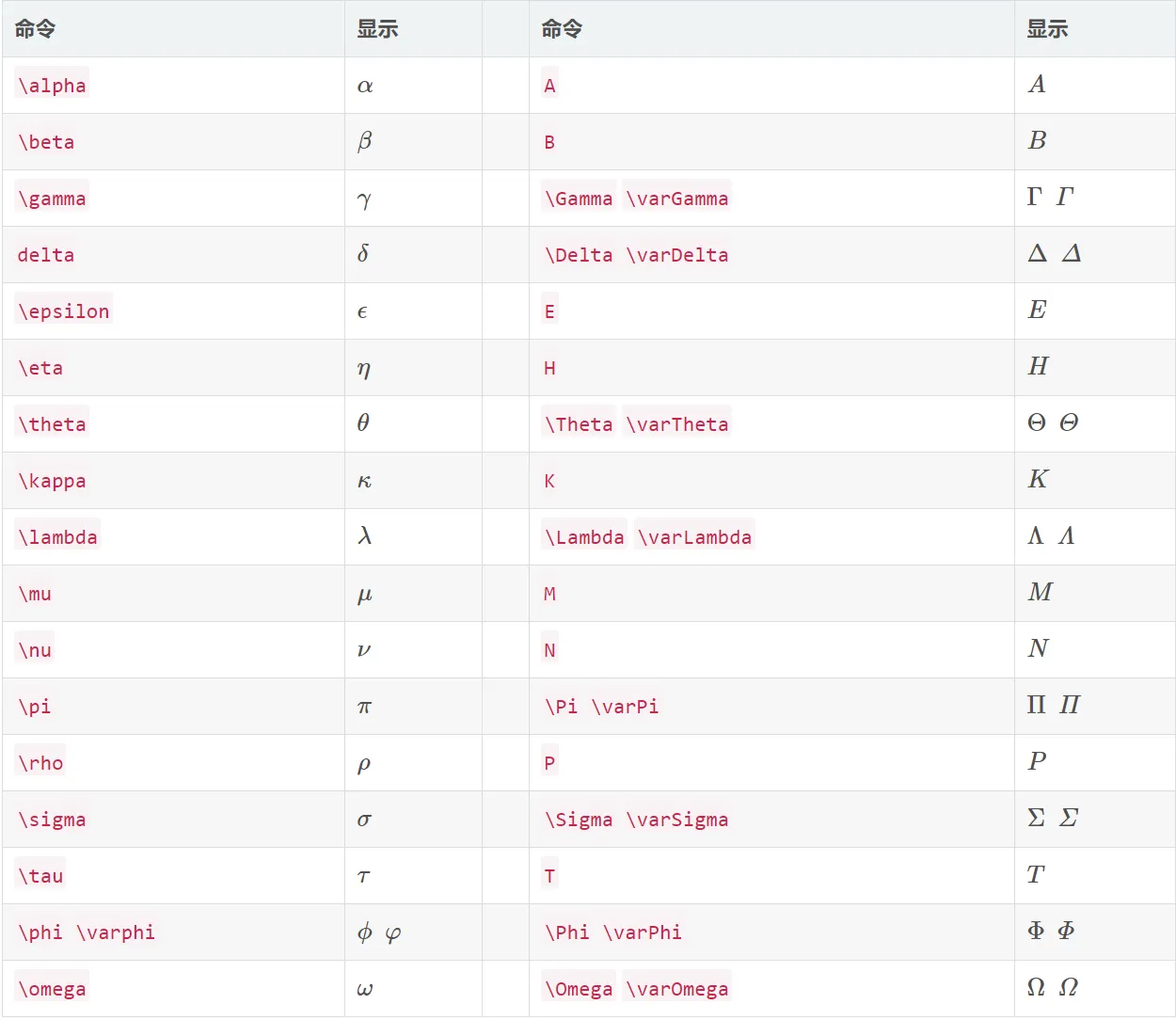
常见符号1:希腊字母
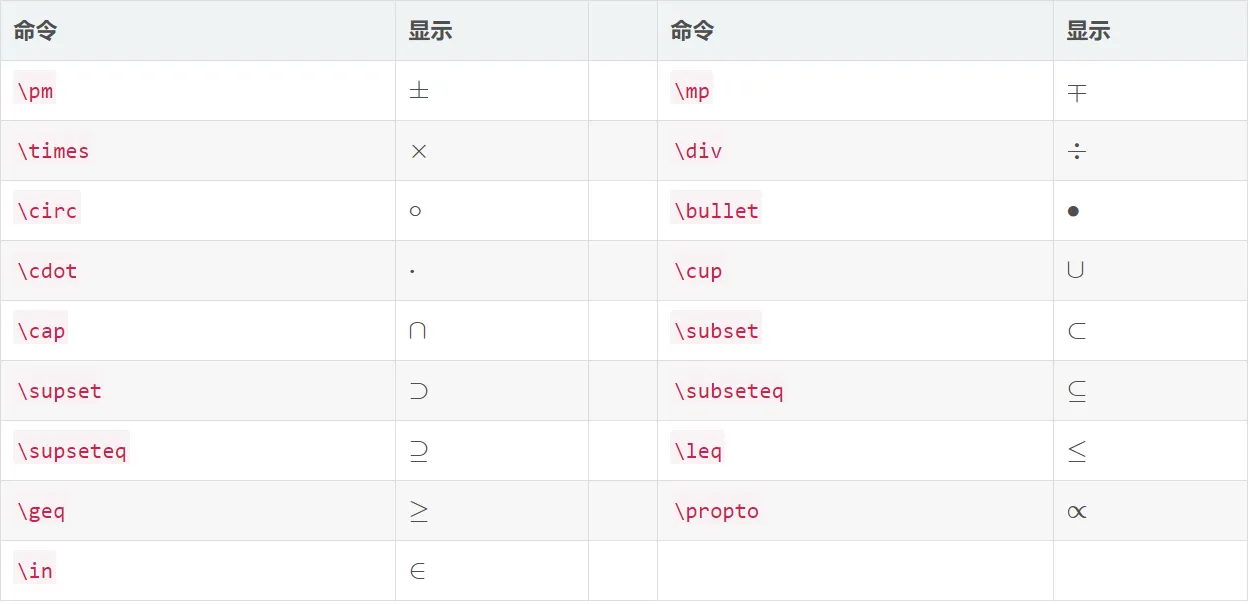
常见符号2:基本运算符
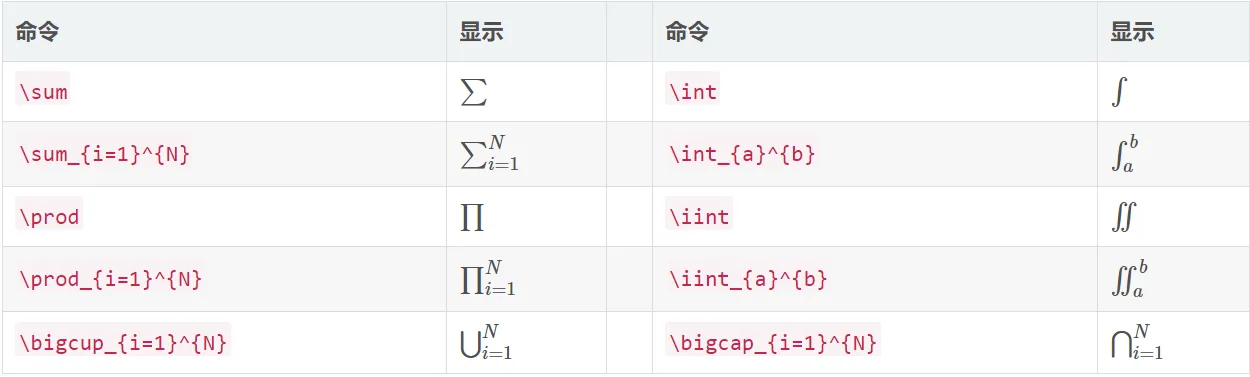
常见符号3:积分求和运算符
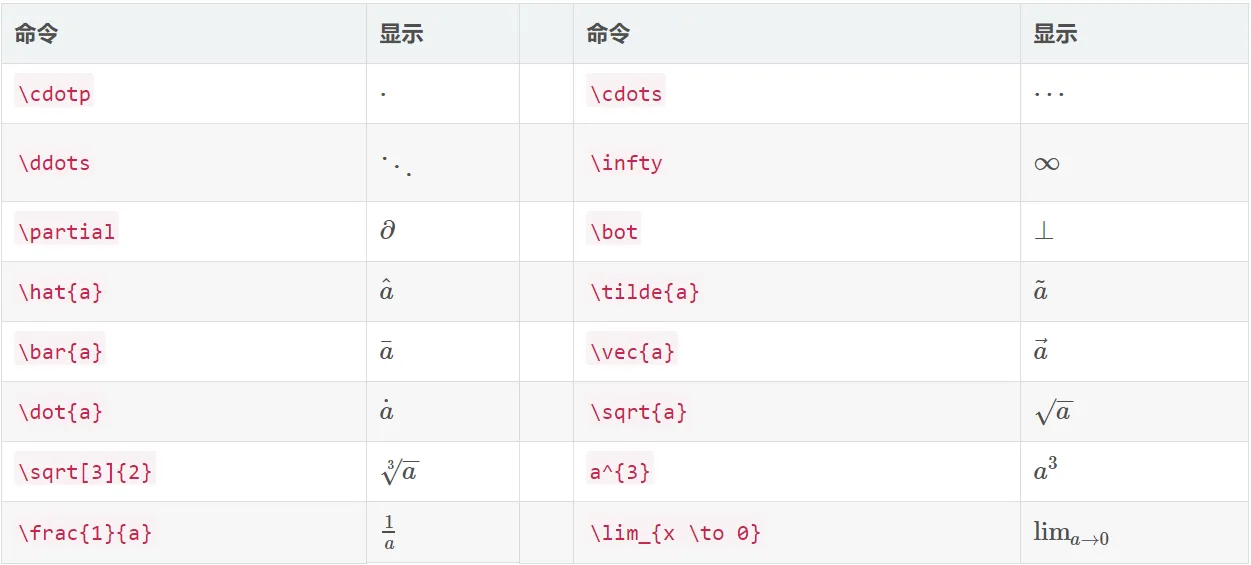
常见符号4:其他运算符
矩阵相关 显示的指定两侧的括号:
\begin{equation}
\left[
    \begin{array}{lll}
        0 & 1 & 0 \\
        0 & 0 & 1 \\
        \epsilon & 0 & 0
    \end{array}
\right]
\end{equation}直接输出圆括号: array ---> pmatrix 直接输出方括号: array ---> bmatrix
公式换行对齐:
\begin{align*}
.....
.....
.....               &= 按照等号对齐
\end{align*}常用宏包#
相关模板#
单页homework(小作业)模板
%!TEX program = xelatex
\documentclass[10pt]{scrartcl}
% package layout
\usepackage[a4paper, left=20mm, right=20mm, top=30mm, bottom=40mm]{geometry}

% UTF8 character set
\usepackage[utf8]{inputenc}

% T1 encoding
\usepackage[T1]{fontenc}
\usepackage{CTEX}
% graph  && color package
\usepackage{graphicx, xcolor}

% Write correct
\usepackage{siunitx}
% transform eps to pdf
\usepackage{epstopdf}

\usepackage{amsmath}


% use sans serif fonts
% \renewcommand{\familydefault}{\sfdefault}

% headings, footer
\usepackage{fancyhdr}

% last page indicator
\usepackage{lastpage}

% formatting captions
\usepackage[center,format=hang,nooneline,labelsep=quad,font={small},labelfont=bf,figurewithin=none]{caption}
\captionsetup[figure]{name=Fig.}

% typewriter for URLs
\usepackage[pdfpagelabels=true,plainpages=false]{hyperref}

\begin{document}

% Define lengths.
\setlength{\textheight}{21cm}
\setlength{\parindent}{0cm}
\setlength{\headheight}{1.75cm}
\setlength{\headsep}{1cm}
\setlength{\footskip}{1.5cm}

\renewcommand{\headrulewidth}{0pt}
\renewcommand{\footrulewidth}{0pt}
%\renewcommand{\figurename}{Abbildung}

\pagestyle{fancy}
\lhead{\vspace*{-1.6cm}\hspace*{-1cm}\includegraphics[scale=0.5]{images/fudan-logo}}
\rhead{Course: Matrix and Tensor Analysis\\Fallsemester 2021/09\\ October 14, 2021}
\lfoot{}
\cfoot{\thepage\ -- \pageref{LastPage}}
\rfoot{\hspace{2cm}\includegraphics[scale=1]{images/logo-slogan}}

\begin{flushright}
{Jiang Haochen\\ School of Data Science \\ 21110980006}
\end{flushright}

\subsection*{Aufgabe 1}
\subsubsection*{Teilaufgabe 1.1}
你的名字, {\kaishu 这里是楷体显示}, {\songti 这里是宋体显示}, {\heiti 这里是黑体显示}, {\fangsong 这里是仿宋显示}

\begin{table}[h]
\begin{tabular}{llr}
\hline
\multicolumn{2}{c}{Item} &            \\ \cline{1-2}
Animal     & Description & Price (\$) \\ \hline
Gnat       & per gram    & 13.65      \\
           & each        & 0.01       \\
Gnu        & stuffed     & 92.50      \\
Emu        & stuffed     & 33.33      \\
Armadillo  & frozen      & 8.99       \\ \hline
\end{tabular}
\end{table}

\subsection*{Aufgabe 2}

\begin{align*}
 f(x) &= (x+a)(x+b) \\
      &= x^2 + (a+b)x + ab
\end{align*}

\subsection*{Aufgabe 3}


\end{document}
算法流程相关模板
相关问题与解答#
Q1: overleaf中如何导入ctex宏包
- 加入ctex的package
\usepackage[UTF8]{ctex}- 设置->修改Latex引擎->选择“XeLatex”